QTimer1.03
Publisher Description
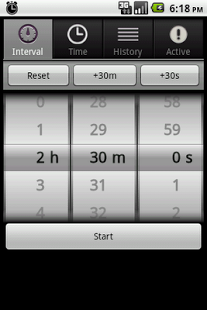
Quickly and easily set an alarm or timer for a specified duration or at a specified time.
No messing with clumsy text fields or multiple button presses just to set a simple alarm. Simply select a time from a scroll wheel interface and click the start button. Great for using as a kitchen timer, egg timer, or any situation where you need to easily create one-off alarms.
Features:
- Be alerted by status bar notification or popup dialog
- Easy-to-use wheel selectors make choosing a time much easier than having to type or click numbers
- Customize or disable ringtones and vibration
- Unlimited number of alarms can be set at one time
- Easily select most often used alarms
- Runs silently in the background (will show an ongoing status notification by default if any alarms are active)
About QTimer
The company that develops QTimer is Krill Software. The latest version released by its developer is 1.03. This app was rated by 1 users of our site and has an average rating of 5.0.
To install QTimer on your Android device, just click the green Continue To App button above to start the installation process. The app is listed on our website since 2011-02-08 and was downloaded 156 times. We have already checked if the download link is safe, however for your own protection we recommend that you scan the downloaded app with your antivirus. Your antivirus may detect the QTimer as malware as malware if the download link to com.joekrill.qtimer is broken.
How to install QTimer on your Android device:
- Click on the Continue To App button on our website. This will redirect you to Google Play.
- Once the QTimer is shown in the Google Play listing of your Android device, you can start its download and installation. Tap on the Install button located below the search bar and to the right of the app icon.
- A pop-up window with the permissions required by QTimer will be shown. Click on Accept to continue the process.
- QTimer will be downloaded onto your device, displaying a progress. Once the download completes, the installation will start and you'll get a notification after the installation is finished.
Program Details
System requirements
Download information
Pricing
Version History
version 1.03
posted on 2011-02-08
New: Running timers can be "cloned" by long pressing them and choosing "Clone" from the context menu.,New: Status bar notification shows when the next timer is set to go off.,Changed: Context menus now work on long click in the Active and History tabs.,Changed: Modified launcher icon.,Fixed: History tab maintains sorting selection.,Fixed: Time formatting if using 24 hour clock.,New: Localized all strings -- please let me know if you'd like to translate into your language!
version 1.03
posted on 2011-02-08
Several fixes and updates
